

Sending feedback
How to send EngageCycle an idea, a problem, or a question from inside the app, and see what happened to it.
Send feedback
- Click the Help button (the question mark in the top bar), then Send feedback. You can also open your account menu (your name, top right) and click Send feedback.
- Under What kind of feedback?, choose Idea, Something's broken, or Question.
- Write it in Your feedback (up to 5,000 characters). Don't include client details, such as government ID numbers. Text that looks like one is refused.
- If a picture helps, use Add an image (optional): a PNG, JPEG, or WebP up to 5 MB. Hidden details in the file, like where a photo was taken, are removed.
- Check Sent with it, so we can look into it, then click Send.
You're taken back to the page you were on, with a thank-you message.
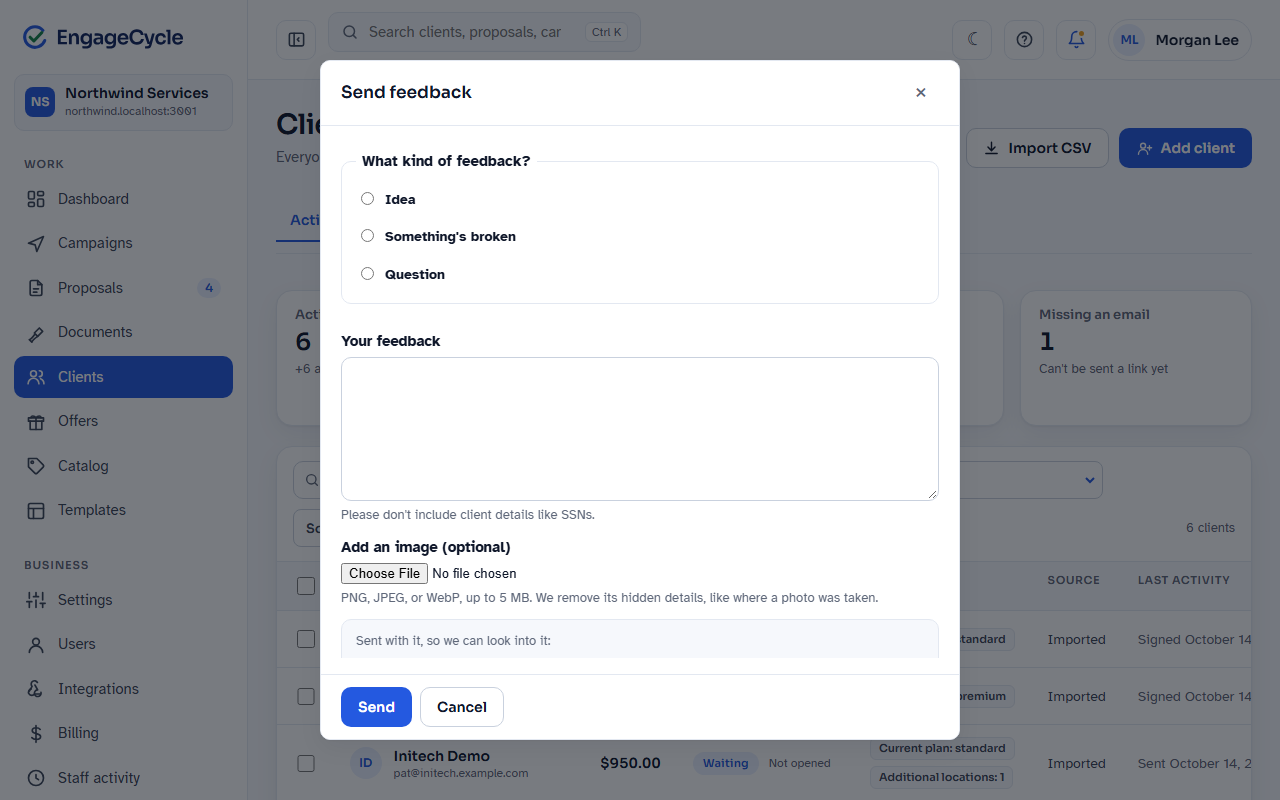
What's sent with it
So the team can look into it, your feedback carries:
- Business: your business's name.
- You: your name and email.
- Page: the admin page you were on (its address only).
- App version and Browser.
Nothing about your clients is attached. No client, proposal, or campaign is read to build it.
See what happened to it
Click Help, then My feedback. You see everything you've sent, newest first, with:
- Its status: New, Looking into it, Planned, Done, or Won't do.
- The image, if you sent one.
- Any reply from EngageCycle, and each status change.
Replies and some status changes are also emailed to you.
Good to know
- Only you see your feedback. An owner doesn't see what their staff sent, and staff don't see the owner's.
- Ten a day. Each person can send up to 10 in any 24 hours. The 11th says so and isn't kept.
- Without scripts the menu items open the same form on its own page.
- During a support session there's no Send feedback: what EngageCycle support does in your business isn't your feedback. See When EngageCycle support helps you.
- Feedback goes to EngageCycle, not to your webhooks. It never appears in your Integrations delivery log.